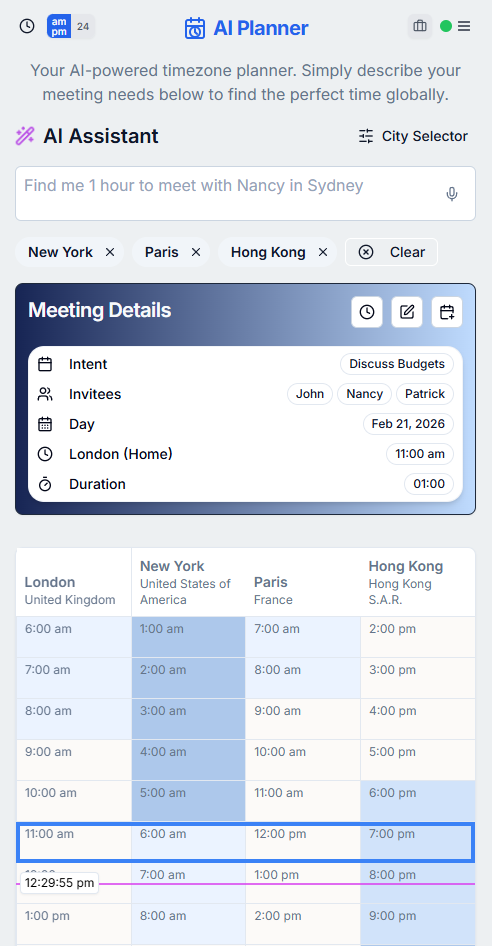
Describe the meeting in natural language
You can write requests such as "project kickoff with London, New York, and Singapore next Tuesday for 90 minutes" or "call Alex in Hong Kong at 8am Hong Kong time tomorrow." The AI parser extracts cities, participants, meeting topic, date, time, timezone, and duration where it can.
This is useful when the scheduling request arrives as a sentence, chat message, or voice note. The AI does the first pass of turning that messy input into meeting details you can review and adjust.
Let AI resolve dates, durations, and timezones
The AI flow is designed to resolve relative dates like tomorrow, next Tuesday, or July 4th against the current date. It also understands common duration phrases such as two hours, 90 minutes, or half an hour and converts them into a usable meeting length.
When you state a time with a city or timezone, WorldTimePlanner can convert that stated time into your home timezone for planning. That helps with requests like "3pm London time" or "noon EST" where the proposed time is not expressed in your own local clock.
Get an automatic time suggestion
If your request includes cities but no specific time, the app can suggest a meeting time automatically. It uses your home timezone, the cities found by the AI, and any already-selected timezones so the suggestion reflects the full group rather than only the newest city mentioned.
The suggestion is still yours to review. The meeting details card and timeline grid make it easy to check the local impact before you export or create a calendar event.
Use voice input for quick planning
The scheduler also supports voice input where available. You can speak the request, let the app transcribe it, and send the final transcript through the same AI parsing flow.
That makes the AI planner useful when you are on mobile, coordinating quickly, or copying a meeting request from a conversation without wanting to manually fill out every field.
Frequently asked questions
What can the AI time zone meeting planner understand?
It can extract cities, participants, meeting topic, date, time, stated timezone, and duration from a natural-language scheduling request.
Can it suggest a meeting time if I do not provide one?
Yes. When cities are detected and no explicit time is provided, WorldTimePlanner can auto-suggest a time based on the selected timezones and your home timezone.
Does voice input use the same AI planner?
Yes. When voice input is supported, the final transcript is sent through the same AI scheduling flow as typed requests.