What a worldwide meeting planner should solve
Global teams rarely need a simple one-to-one timezone conversion. They need to know whether a proposed time is fair for New York, London, Berlin, Dubai, Singapore, Sydney, and any other city on the invite. A good world meeting planner turns that comparison into a shared view.
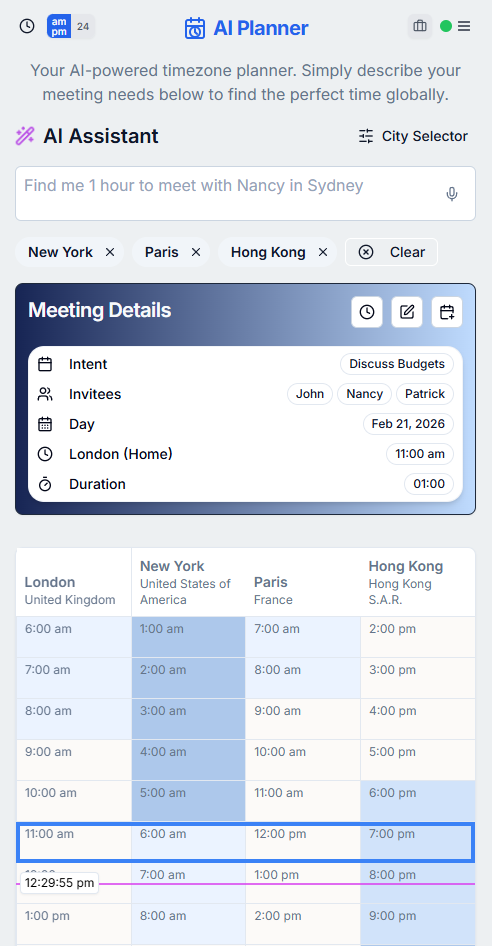
WorldTimePlanner.ai is built for those practical scheduling questions. Add the cities involved, compare local times, and use the meeting grid to see where business hours overlap before you send a calendar invite.
How to find a fair international meeting time
Start by listing the cities or regions involved, then look for a time that keeps most participants inside normal working hours. If no perfect overlap exists, choose the least disruptive time and rotate future meetings so the same group is not always taking the early or late call.
This is especially important for recurring team meetings, customer calls, interviews, incident reviews, product launches, and cross-functional planning sessions. A fair schedule is easier to defend when the local times are visible to everyone.
Why city names beat timezone abbreviations
Timezone abbreviations can be ambiguous and can change with daylight saving time. A city name is usually clearer because it maps to a real local timezone with real clock-change rules.
When planning a global meeting, use cities such as Los Angeles, Toronto, London, Berlin, Mumbai, Singapore, or Tokyo instead of relying only on abbreviations like PST, EST, GMT, CET, or IST.
Use the planner before the calendar invite
Calendar apps are good at creating events, but they are not always the best place to decide the meeting time. It is easy to send an invite that looks fine in your own calendar while landing too early or too late somewhere else.
Use WorldTimePlanner.ai as the planning step first. Once the timing looks right, review the meeting details and move the chosen time into your calendar workflow.
Frequently asked questions
What is a worldwide meeting planner?
A worldwide meeting planner is a tool for comparing local times across cities and finding meeting slots that work for international teams.
How do I schedule a meeting across several countries?
Add each participant city, compare working-hour overlap, confirm the date for each location, and choose the least disruptive time for the group.
Is WorldTimePlanner.ai free to use?
Yes. WorldTimePlanner.ai provides free timezone planning tools for comparing cities, planning meetings, and viewing world clocks.